

Check out our new eBook -- How to be 99% SPAM FREE.
This little book is a compilation of years of advice about how to PREVENT and MANAGE spam.
Below are some of the details discussed in the ebook, but please read the book. There is so much more!
- MailScanner -- Customize your settings
- Boxtrapper -- A “challenge/response” verification system
- Filters -- Account wide or for individual mailboxes
Each of these methods can help with the task of managing and controlling spam. MailScanner is already enabled for each account, but you can edit the settings to make them stronger or weaker. Boxtrapper is best for short periods of time. And filters work well for controlling specifics.
Please click the links below for more detailed explanation for the best use of:
Filters:
In the Mail section of cpanel are the User Level Filtering and Account Level Filtering features.
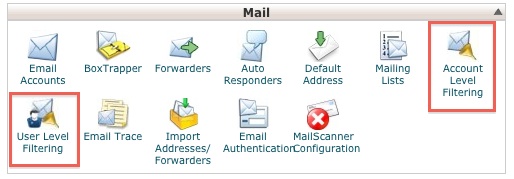
Here you can set up custom rules to deal with specific conditions. For example, you could set up a rule that says any message from John Doe, or with Viagra in the subject will be deleted. Don't go crazy trying to set up a filter for every piece of spam you get. This feature is best when you have a bunch of spam with a common element (which is rare).
Filters can also be used in other ways, such as sending all messages from your mom or your boss, or messages with a specific subject (sales), to a designated folder, helping you sort out what's most important.
When you set up a filter, you identify a set of conditions and then instruct the filter to take a specific action. For example:
Condition: Any message from John Doe
Action: Forward to (email address)
or
Condition: Any message with viagra in the body
Action: Delete message
Please let us know if you have any questions or need further help.
