


Add a Calendar to your website

LinkskyVisualFullLogo.jpg

Click here to visit our LinkskyVisual.com home page.
Sign up for your Free Trial today!


Looking for a calendar for your website?  You can add a calendar to your site by using a service like the Google calendar or calendars.net.

To do this, you will need to copy the HTML embed code provided by the website where you decide to create your calendar, then go back to your LinkskyVisual SiteBuilder and follow these steps:

  1. Click on Widgets > Popular.
  2. Drag and drop the HTML Code Widget onto your page.
  3. Paste the code into the HTML Editor. Use right-click > paste or ctrl-V to paste.
  4. When you are done, click "Save". 
  5. You will see calendar displayed on your page.
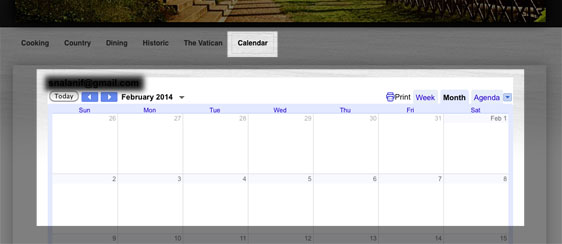
    Visual-31.jpg

Please let us know if you have any questions or need further help.

  • 0 Bu dökümanı faydalı bulan kullanıcılar:
Bu cevap yeterince yardımcı oldu mu?

İlgili diğer dökümanlar

What's new?

Not much right now, but check back. Things are bound to get even better!

Visit our home page here

Visit our home page here → LinkSkyVisual.com

Planning your site with SEO in mind: Choosing Keywords, Creating a Site Plan & Domain Names

1. What are keywords?Keywords are the words and phrases that Internet users type into the search...

Optimizing your site for local search

What is local search and why is it important?If you are a business that depends on local...

Adding "alt text" to pictures

Search engines cannot "see" pictures, they read text. You can help the search engines "see" the...