

Please let us know if there is something we can do to keep your account with us; if there is a feature that you need that you cannot find or an issue with our service.
If you would like to cancel LinkSky Hosting service, which includes your website and email:
- Login to LinkSky.com using the email address on-file
- Note: Cancellation requests must be submitted before the new billing cycle through LinkSky.com
- Click "Services" drop-down menu
- Click "My Services"
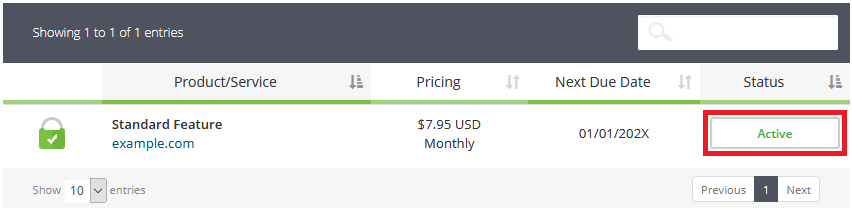
- Click status button under "Status" heading in table (see screenshot below)
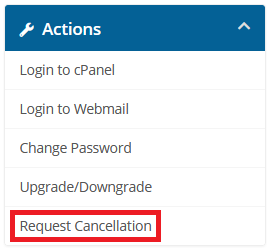
- Click "Request Cancellation" under "Actions" (see screenshot below)
- Enter a reason for cancellation in the "Briefly Describe your reason for Cancellation" field
- Select "Cancellation Type", which is either "Immediate" or "End of Billing Period"
- Click the "Request Cancellation" button
- Note: You will receive a cancellation confirmation email to the email address on file. If you do not get a cancellation confirmation email, then service was not cancelled or the email went to your spam/junk email folder.
Thank you for being a valued LinkSky Hosting member!
We hope you will consider LinkSky Value Host again in the future.
Please let us know if you have any questions or need further help.
