

You have two options. The first option creates a mailbox on the server. The second option creates an address that forwards to another mailbox.
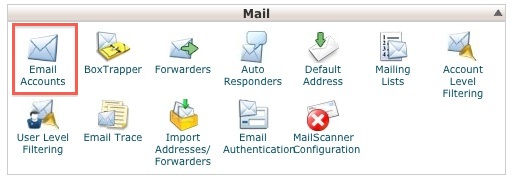
Option One: Access your cPanel. In the Mail section, click on Email Accounts.
Type the "user" part of the email address. The domain name is already there.
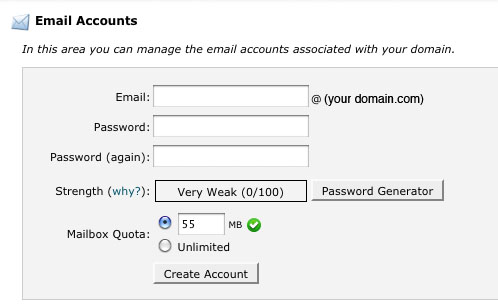
Give yourself a password or use the Password Generator.
The default mailbox size is 55 MB. You can adjust this up or down. Please do NOT use an unlimited quota, as this can result in an extremely large mailbox that may become unmanageable.
Click on Create Account.
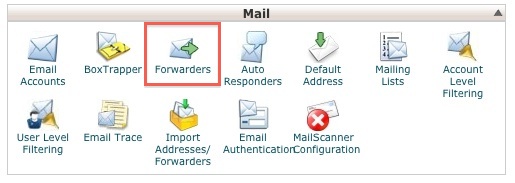
Option Two: Access your cPanel. In the Mail section, click on Forwarders.
Click on the Add Forwarder button.
Type the "user" part of the email address. The domain name is already there.
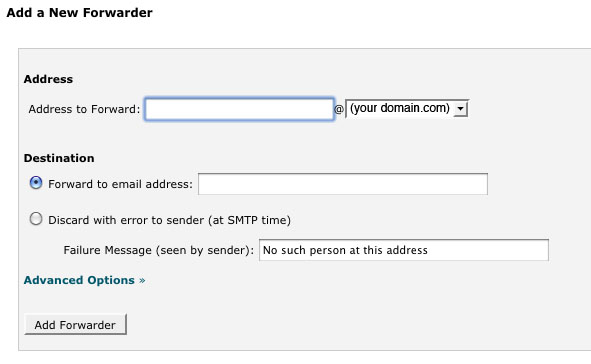
In the next box, type the address where you would like the mail to be delivered. This can be another mailbox in your account or off-server address such as gmail, etc.
VERY IMPORTANT: If you forward your messages, you do NOT need a mailbox for that address on the server.
Please let us know if you have any questions or need further help.
