

How Do I Add a Domain Alias (Parked Domain)?

Domain aliases, also called parked domains, are used to point another domain to your existing website. Our plans currently include unlimited domain aliases.

To setup a domain alias (parked domain):

  • Change your domain's name servers to LinkSky
  • Login to cPanel (or have the account owner login to cPanel)
  • Click the "Alias" icon under the "Domains" section (see screenshot below)
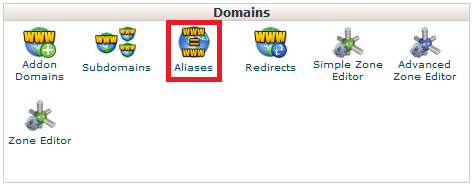
    how do i add a domain alias parked domain click aliases
  • Enter your domain name into the "Domain" field
  • Click the "Add Domain" button

Please let us know if you have any questions or need further help.

  • 0 brukere syntes dette svaret var til hjelp
Var dette svaret til hjelp?

Relaterte artikler

How Do I Access LinkSky Visual Site Builder?

LinkSky Visual site builder is a great way to build and update a website! You'll love the...

How Do I Add a New LinkSky.com User?

There are many reasons a LinkSky member may want or need to add additional LinkSky.com users to...

My Website is Down

For security, your IP address (see https://www.linksky.com/ip/) may have been automatically and...

SSL Certificate for My Website

Great news, we recently rolled out Let’s Encrypt certificates to members! The goal is to provide...

VPN with Opera Web Browser

Opera (https://www.opera.com/) the Web browser, which is based on Chrome, has built-in VPN...