

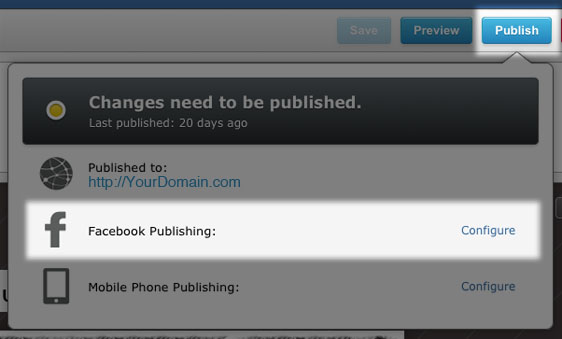
Once you have published your site to your hosting account, you can enable Facebook publishing using this method:
- Hover your mouse over the Publish button.
- Next to Facebook Publishing click on Configure.
- In the dialog box that opens, click on Connect with Facebook. You will be taken through the process, which includes a one-time sign-in to your Facebook account. This is done to allow the Sitebuilder to communicate with your page and publish to it.
- If you have more than one Facebook Page, select the Facebook Page you'd like to publish your site on.
- Click OK.
- Your Facebook Page will automatically be updated when you republish your LinkSky Visual site.
What happens if I add my website to a second Facebook Page?
A LinkskyVISUAL site can be connected to only one Facebook page. If you connect your site to a new Facebook page, the previous connection is broken and the tab on the first page won’t resolve. If you’d like to create tabs on multiple Facebook timelines, we suggest you create multiple LinkskyVISUAL websites.
What happens if I don’t have a Facebook Page?
You can create a new Facebook page here.
Please let us know if you have any questions or need further help.
