

As of August 16, 2021, members must access cPanel using single sign-on by logging into LinkSky.com.
Members: Login to cPanel through LinkSky Website
- Open your Web browser (Chrome, Firefox, Edge, Safari, etc.) and visit:
- Click "Login" in the top right corner of the LinkSky homepage
- Login using the email address on-file
- Note: If you do not know your LinkSky.com password, then click the "Request a Password Reset" link
- Make sure to complete steps 4 & 5 below
- Note: If you do not know your LinkSky.com password, then click the "Request a Password Reset" link
- Scroll down to the "Hosting Services" section
- Click the blue Open cPanel button (see screenshot below)

Resellers: Login to cPanel through the website
- Open your Web browser (Chrome, Firefox, Edge, Safari, etc.) and visit:
- https://cpanel.yourdomain.com/
- Note: replace yourdomain.com with your actual domain name
- https://cpanel.yourdomain.com/
- Login using the cPanel username and password
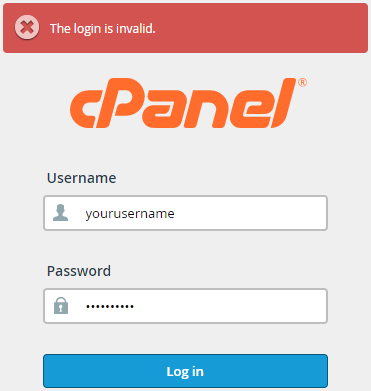
- Note: If you get an error message stating, "The login is invalid" (see screenshot below), then the username and/or password is incorrect.
- See help article, "I Cannot Login or Access cPanel"
- See help article, "I Cannot Login or Access cPanel"
- Note: If you get an error message stating, "The login is invalid" (see screenshot below), then the username and/or password is incorrect.
Please let us know if you have any questions or need further help.
