

LinkSky Visual gives you the option to either change the background color of your style or upload your own background image, or both! You can also apply it to all the pages on your site, or only the ones you select.
Although you can use any size for a background image, if your image is too narrow you may get a tiling effect. The height of the image is less of an issue as your page will expand based on how much content you add to it.
Try an image of 1500-1700 pixels in width to avoid tiling. (See additional resources at the end of this article.)
Please note: Some styles do not have this option. To find out whether this option is available for a particular style, open up the Style menu and hover your mouse over the style.
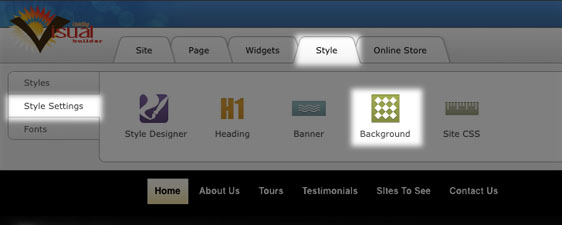
Edit the page background color
- Click on Style > Edit Background.
- A dialog box will open, click on the down-arrow next to "Background Fill" and the color picker will open.
- Select the color you would like to use and click on "OK". If you know the Hex value (six digit number) of the color you would like to use, enter it into the space provided. (For easy reference, here's a link to a Hex color generator).
Upload your own background image
- Click on Style > Edit Background.
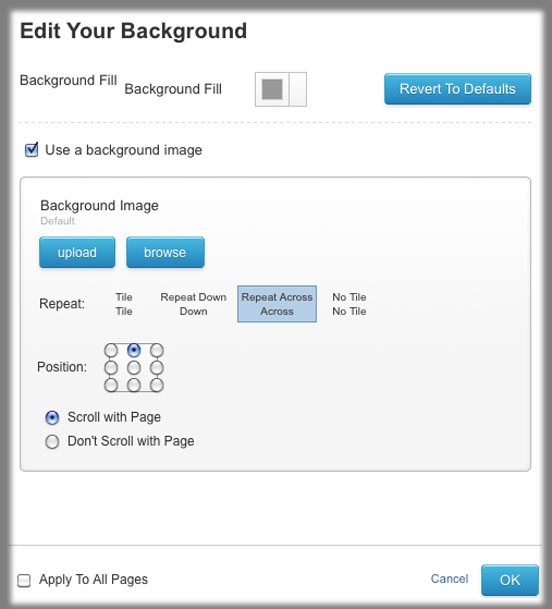
- A dialog box will open, check the box next to "Use a background image".
- You can now either "upload" a file from your computer or "browse" for an image file from the File Manager.
- Once uploaded, customize your settings - whether you would like the image to tile (repeat), where you would like the background to be located on the page and if you would like the background to scroll with the page or not.
You may be interested in these background image resources:
- The Tartan background pattern generator: tartanmaker.com
- Stripe generator: stripegenerator.com
- Palette generator (generates a palette based on a picture) if you want to match your background to a color on an image: bighugelabs.com
- Gradient Image maker: tools.dynamicdrive.com/gradient
- BG Patterns: bgpatterns.com
- Eos Development: eosdev.com
- Hex color generator (6 digit color identifier): cloford.com
Please let us know if you have any questions or need further help.
