

Many third-party software packages, such as WordPress, Joomla, Drupal, etc. recommend and/or require a newer version of PHP to be used.
To change PHP version, for example from PHP 5.6 to PHP 7.4:
- Login to cPanel (or have the account owner login to cPanel)
- Not sure how to login to cPanel? See help article, "How Do I Login to cPanel?"
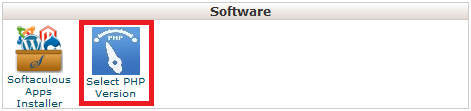
- Click the "Select PHP Version" icon under the "Software" section (see 1st screenshot below)
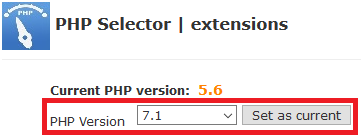
- Change the "PHP Version" in the drop-down from the current version to the new version you want to use
- Click the "Set as current" button (see 2nd screenshot below)
- Note: Changes happen immediately after clicking set as current
Note: This changes the PHP version for all websites in your hosting service, including addon domains, and cannot be changed individually, which is why we recommend you buy separate hosting accounts for each website.
Please let us know if you have any questions or need further help.
