

Some third-party software packages, such as WordPress, Joomla, Drupal, etc. require certain PHP extensions to be installed and enabled in order for their software to work properly. LinkSky Hosting offers many PHP extensions to choose from and enabling/disabling a PHP extension is easy.
Note: We do not recommend disabling any of the default PHP extensions.
To enable/disable PHP extensions:
- Open your Web browser (Chrome, Firefox, Edge, Safari, etc.) and visit:
- https://yourdomain.com/cpanel/
- Note: replace yourdomain.com with your actual domain name
- https://yourdomain.com/cpanel/
- Login to cPanel
- Note: If you get an error message stating, "The login is invalid", then your username and/or password is incorrect.
- See help article, "I Cannot Login or Access cPanel"
- Note: If you get an error message stating, "The login is invalid", then your username and/or password is incorrect.
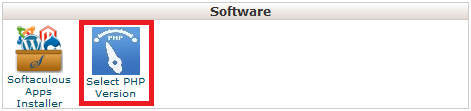
- Click the "Select PHP Version" icon under the "Software" section (see 1st screenshot below)
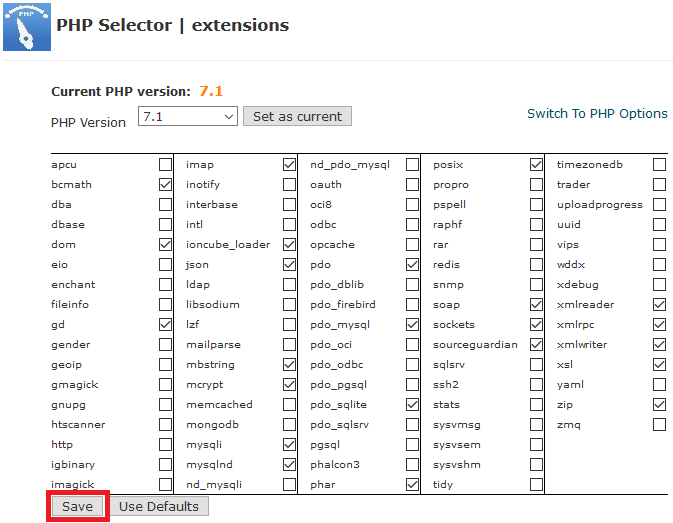
- Check to enable or uncheck to disable PHP extensions (see 2nd screenshot below)
- Click the "Save" button when you are finished selecting or unselecting PHP extensions (see 2nd screenshot below)
- Note: Changes happen immediately after clicking save
- Note: Changes happen immediately after clicking save
Note: This changes the PHP extensions for all websites in your hosting service, including addon domains, and cannot be changed individually, which is why we recommend you buy separate hosting accounts for each website.
Please let us know if you have any questions or need further help.
