

The best way to submit a request to cancel your hosting account is through your BILLING SERVICES account. Instructions for accessing your account are here.
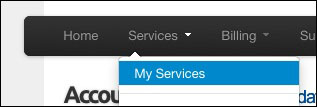
Once you have access, click on Services in the navigation bar and select My Services from the drop down menu. The next screen will display a list of your accounts.
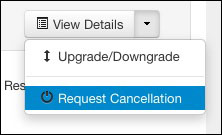
To the far right click on View Details. On the next screen, click on Management Actions and select Request Cancellation from the drop down window.
The next window will display a Comment box where you can briefly describe your reason for the cancellation. We do appreciate your feedback. Also, the default is Immediate Cancellation, but you can also select End of Billing Period.
Click the Request Cancellation button.
As soon as we process your request, you will receive confirmation. And the account will show as Cancelled in your Billing Services account.
To log out of the Billing Services area, click the Hello, link and select Log Out.
Please let us know if you have any questions or need further help.
