

Cron jobs are command-line scheduled tasks, which can run an operating system command directly.
To add/setup a cron job:
- Login to cPanel
- Open your Web browser (Chrome, Firefox, Edge, Safari, etc.) and visit:
- https://yourdomain.com/cpanel/
- Note: replace yourdomain.com with your actual domain name
- https://yourdomain.com/cpanel/
- Not sure how to login to cPanel? See help article, "How Do I Login to cPanel?"
- Open your Web browser (Chrome, Firefox, Edge, Safari, etc.) and visit:
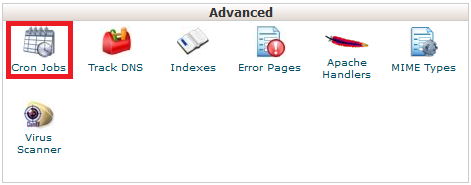
- Click the "Cron Jobs" icon in the "Advanced" section (see screenshot below)
- Note: We recommend entering your email address in the "Email" field and then clicking the "Update Email" button to save
- This only needs to be completed one time and will cause the cron notifications to be sent to your email address
- Select the interval you want to run the cron job under "Add New Cron Job" heading
- Enter the command in the "Command" field you want to execute each time the cron job is run at the specified interval (see below for an example)
- Click the "Add New Cron Job" button
Here is an example cron job command:
php -q /home/yourusername/public_html/cron.php >/dev/null 2>&1
Note: This will execute PHP to run the cron.php script in the public_html folder and supress the output.
Please let us know if you have any questions or need further help.
