If you are unable to login to WordPress Admin (for example: https://yourdomain.com/wp-admin/), then there are two ways to change your WordPress Admin password:
Option 1: WordPress "Lost Your Password?"
- Open your Web browser (Chrome, Firefox, Edge, Safari, etc.) and visit:
- https://yourdomain.com/wp-admin/
- Note: replace yourdomain.com with your actual domain name
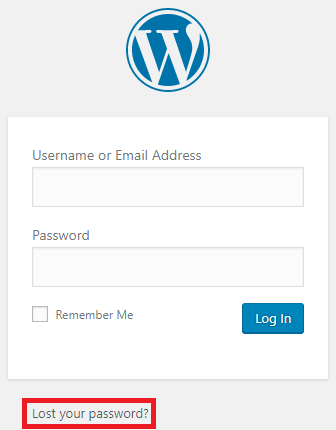
- Click "Lost your password?" (see screenshot below)
- Enter your email address into the "Username or Email Address" field
- Click the "Get New Password" button
- WordPress will send a password reset email to the email address, if the email address entered matches the email address on the WordPress admin user
- Follow the instructions in the email to reset your WordPress Admin password
- Note: If you did not get an email, then:
- The email address does not match the email address on the WordPress admin user
OR
- Check your junk/spam folder
|
|
Option 2: Softaculous in cPanel
If you are not able to reset your password using option 1, then you can login to WordPress Admin and reset your password through Softaculous in cPanel.
- Login to cPanel (or have the account owner login to cPanel)
- Click the "Softaculous Apps Installer" icon in the "Software" section
- Click "Installations"
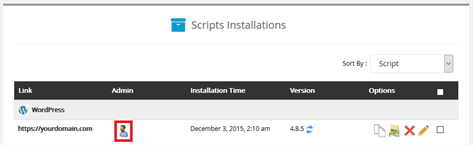
- Click the "Admin" icon (see screenshot below)
- Note: This will take you into WordPress Admin, so you can change your password
|
Please let us know if you have any questions or need further help.