

Please let us know if there is something we can do to keep your account with us; if there is a feature that you need that you cannot find or an issue with our service.
If you would like to cancel LinkSky Hosting service, which includes your website and email, here are step-by-step instructions:
- Login to LinkSky.com using the email address on-file
- Note: Cancellation requests must be submitted before the new billing cycle through LinkSky.com portal
- Click "Services" drop-down menu
- Click "My Services"
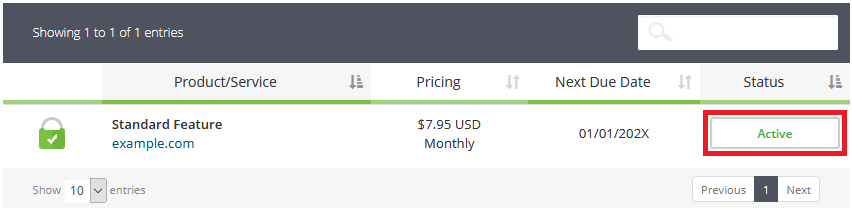
- Click status button under "Status" heading in table (see screenshot below)
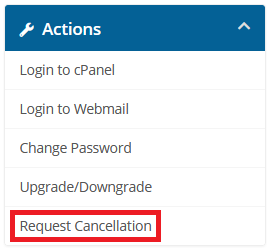
- Click "Request Cancellation" under "Actions" (see screenshot below)
- Enter a reason for cancellation in the "Briefly Describe your reason for Cancellation" field
- Select "Cancellation Type", which is either "Immediate" or "End of Billing Period"
- Click the "Request Cancellation" button
- Note: You will receive a cancellation confirmation email to the email address on file. If you do not get a cancellation confirmation email, then service was not cancelled or the email went to your junk email folder.
Keep in mind, unless service cancellation is submitted through our LinkSky.com portal using the instructions above, then you will continue to be billed.
Thank you for being a valued LinkSky Hosting member!
We hope you will consider LinkSky Value Host again in the future.
Please let us know if you have any questions or need further help.
