

How can I make html images show in Horde webmail?

To switch on HTML inline images when using Horde, just do this:

  1. Log into your webmail, then select Horde.

    Horde-Logo.jpg
  2. Click the Options icon in the top tool bar, then select Mail in the Edit options for: menu and click Go.
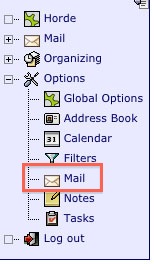
    Horde-Options.jpg
  3. Select Message Viewing in the middle Message Options column.

    Horde-Message-Viewing.jpg
  4. Deselect the following option:
    - Block images in HTML messages unless they are specifically requested?

    Horde-HTML-Images.jpg

Please let us know if you have any questions or need further help.

  • 0 用戶發現這個有用
這篇文章有幫助嗎?

相關文章

How to Resize Large Image Attachments in Outlook

When you have to send someone a large image file through email, it’s a good idea to resize the...

Getting Started with Pinterest

Linking your Pinterest boards to your Linksky Visual site  is a great way to get traffic to your...

Adding a “LinkedIn” button

Adding a LinkedIn Share button to your website is a great way to share your website with a...

What is the Online Store?

LinkSky Visual's Online Store is a feature-rich online store, that gives you one-stop store and...

25 Commonly Used Internet Marketing Terms

adwords - Google's pay-per-click platform that allows advertisers to place paid ads that come up...