

How do I upgrade or downgrade my hosting plan?

From within your Billing Services account, select Services, and then My Services from the black navigation bar.
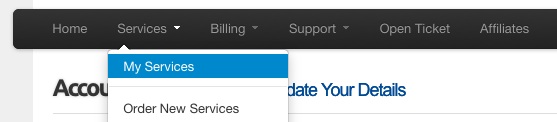
LSFAQ-Upgrade1.jpg

Then click the View Details button for your domain name.
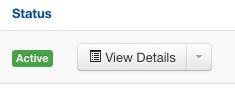
LSFAQ-Upgrade2.jpg

Next, click on Management Actions, and select the Upgrade/Downgrade menu item.
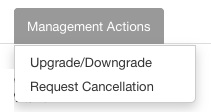
LSFAQ-Upgrade3.jpg

For information on how to access your Billing Services account, click here.

Please let us know if you have any questions or need further help.

  • 0 istifadəçi bunu faydalı hesab edir
Bu cavab sizə kömək etdi?

Uyğun məqalələr

How to Resize Large Image Attachments in Outlook

When you have to send someone a large image file through email, it’s a good idea to resize the...

Getting Started with Pinterest

Linking your Pinterest boards to your Linksky Visual site  is a great way to get traffic to your...

Adding a “LinkedIn” button

Adding a LinkedIn Share button to your website is a great way to share your website with a...

What is the Online Store?

LinkSky Visual's Online Store is a feature-rich online store, that gives you one-stop store and...

25 Commonly Used Internet Marketing Terms

adwords - Google's pay-per-click platform that allows advertisers to place paid ads that come up...